<!DOCTYPE html
PUBLIC "-//W3C//DTD XHTML 1.0 Transitional//EN"
"http://www.w3.org/TR/xhtml1/DTD/xhtml1-transitional.dtd">
<html xmlns="http://www.w3.org/1999/xhtml">
<head>
  <title>
    
      QuickStart in Peekko Chat
    
  </title>

  <meta http-equiv="Content-Type" content="text/html; charset=UTF-8" />

  <style type="text/css">
    h1#pageName, .newWikiWord a, a.existingWikiWord, .newWikiWord a:hover, #TextileHelp h3 { 
      color: #FA6F00; 
    }

    #Container, #Content {
      width: 600px;
    }
    #Container {
	float: none;
	margin: 0 auto;
	text-align: center;
}

#Content {
	margin: 0;
	padding: 5px;
	text-align: left;
	border-top: none;
	float: left;
}

body { background-color: #fff; color: #333; }

body, p, ol, ul, td {
	font-family: verdana, arial, helvetica, sans-serif;
	font-size:   13px;
	line-height: 18px;
}

a { color: #000; }
a:visited { color: #666; }
a:hover { 
  color: #fff; 
  background-color:#000; 
}

.newWikiWord { background-color: #eee; }
.newWikiWord a:hover { background-color: white; }

h1, h2, h3 { color: #333; font-family: georgia, verdana, sans-serif; }
h1 { font-size: 28px }
h2 { font-size: 19px }
h3 { font-size: 16px }

h1#pageName {
  margin: 5px 0 0;
  padding: 0;
  line-height: 28px;
}

h1#pageName small {
  color: #444;
  line-height: 10px;
  font-size: 10px;
  padding: 0;
}

a.nav, a.nav:link, a.nav:visited { color: #000; }
a.nav:hover { color: #fff; background-color:#000; }

li { margin-bottom: 7px }

.navigation {
  margin-top: 5px;
  font-size : 12px;
  color: #999;
}

.navigation a:hover { color: #fff; background-color:#000; }

.navigation a {
  font-size: 11px;
  color: black;
  font-weight: bold;
}

.navigation small a {
  font-weight: normal;
  font-size: 11px;
}
  
.navOn{
  font-size: 11px;
  color: #444;
  font-weight: bold;
  text-decoration: none;
}

.help {
  font-family: verdana, arial, helvetica, sans-serif;
  font-size: 11px;
}

.inputBox {
  font-family: verdana, arial, helvetica, sans-serif;
  font-size: 11px;
  background-color: #eee;
  padding: 5px;
  margin-bottom: 20px;
}

blockquote {
  display: block;
  margin: 0px 0px 20px 0px;
  padding: 0px 30px;
  font-size:11px;
  line-height:17px;
  font-style: italic;  
}

pre {
  background-color: #eee;
  padding: 10px;
  font-size: 11px;
  overflow: auto;
}

ol.setup {
  font-size: 19px;
  font-family: georgia, verdana, sans-serif;
  padding-left: 25px;
}

ol.setup li {
  margin-bottom: 20px
}

.byline {
  font-size: 10px;
  font-style: italic;  
  margin-bottom: 10px;
  color: #999;
}

.references {
  font-size: 10px;
}

.diffdel, del.diffmod {
  background: pink;
}

.diffins, ins.diffmod {
  background: lightgreen;
}

#footer {
  height: 14px;
  padding: .25em 0;
}

#footer p {
  font-size: 10px;
  color: gray;
  font-style: italic;
  margin: 0;
  float: right;
  text-align: right;
}

#error {
  color: #8b0000;
  font-style: italic;
  width: 600px;
}

#info {
  color: #006400;
  font-style: italic;
  width: 600px;
}

#TextileHelp table {
  margin-bottom: 0;
}

#TextileHelp table+h3 {
  margin-top: 11px;
}

#TextileHelp table td {
  font-size: 11px;
  padding: 3px;
  vertical-align: top;
  border-top: 1px dotted #ccc;
}

#TextileHelp table td.arrow {
  padding-right: 5px;
  padding-left: 10px;
  color: #999;
}

#TextileHelp table td.label {
  font-weight: bold;
  white-space: nowrap;
  font-size: 10px;
  padding-right: 15px;
  color: #000;
}

#TextileHelp h3 {
  font-size: 11px;
  font-weight: bold;
  font-weight: normal;
  margin: 0 0 5px 0;
  padding: 5px 0 0 0;
}

#TextileHelp p {
  font-size: 10px;
}

.rightHandSide {
  float: right;
  width: 147px;
  margin-left: 10px;
  padding-left: 20px;
  border-left: 1px dotted #ccc;
}

.rightHandSide p {
  font-size: 10px;
}
 
.newsList {
  margin-top: 20px;
}

.newsList p {
  margin-bottom:30px
}

td {border:thin solid grey;}
table {
   border:  double black;
   border-collapse: collapse;
}

.byline {
  padding-top: 15px;
}

/* Affects the display of "category: ..." */
.property {
  color: grey;
  font-size: 10px;
}

  </style>


  <style type="text/css">
    @import url("http://peekko.com/chat/style/chat-feed.css");

.leftHandSide {
  float: left;
  width: 147px;
  margin-left: 10px;
  padding-left: 20px;
}


    .newWikiWord { background-color: white; font-style: italic; }
  </style>

  
  	<link href="http://peekko.com:2500/chat/rss_with_headlines" rel="alternate" title="RSS" type="application/rss+xml" />
  	<link href="http://peekko.com:2500/chat/rss_with_content" rel="alternate" title="RSS" type="application/rss+xml" />
  
</head>

<body>

<div id="Container">
<div id="Content">
  <h1 id="pageName">
    
      <small>Peekko Chat</small><br />
      QuickStart
    
  </h1>


<h2>Installing</h2>

<p>Install the extension by clicking on the following link using <a href="http://getfirefox.com">Firefox 1.5</a>.</p>

<p><a href="http://peekko.com/chat/peekko-latest.xpi">peekko-latest.xpi</a></p>

<p>Restart Firefox to complete the installation process.  You should see a new toolbar as shown below.</p>

<p><img src="http://peekko.com/chat/images/toolbar-not-connected.png" alt="toolbar"/></p>

<h2>Personalizing</h2>

<p>Click on the "Options" button in the toolbar and select a set of nicknames to give yourself.  If your nickname is taken, it will use one of your alternate nicknames.  <strong>Note:</strong> If you skip this step, you might be given an unfavorable nickname from the nickname generator like "kurblatz18".  </p>

<p>Here are my nicknames as an example:</p>

<p><img src="http://peekko.com/chat/images/options-nicknames.png" alt="options"/></p>

<h2>Connecting</h2>

<p>To see how many people are at a given page, click "Connect."  </p>

<p><img src="http://peekko.com/chat/images/toolbar-connected.png" alt="toolbar"/></p>

<p>From the screenshot we can see that there are three people in this chat room.  </p>

<h2>Joining</h2>

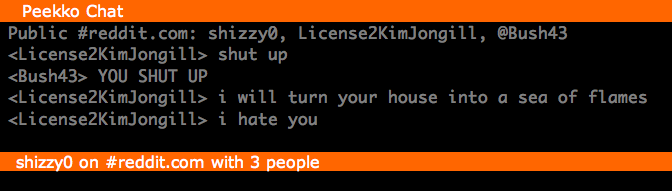
<p>Click "Join" and a chat window will pop up at the bottom of the browser window.  (Reenactment of fictional IM conversation between <a href="http://users.livejournal.com/kim&#95;jong&#95;il&#95;&#95;/889.html">George Bush and Kim Jong-il</a>).</p>

<p><img src="http://peekko.com/chat/images/chat-window-partial.png" alt="toolbar"/></p>

<p>You can hide this chat window at any time by hitting the minus button on the right, or you can hit the "Hide" button in the toolbar.  The chat window can also be resized by dragging on its title bar.  </p>

<p>While this is getting off the ground, I'd recommend sticking to #<a href="http://peekko.com">peekko.com</a> for instant gratification.</p>

<h2>Chatting</h2>

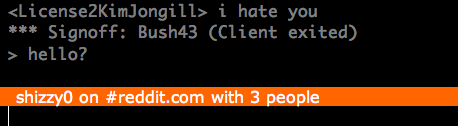
<p>Click on the bottom text input box (the bottom black bar).  Enter something to say.</p>

<p><img src="http://peekko.com/chat/images/enter-input.png" alt="toolbar"/></p>

<p>Hit return to send the message to everyone in the chat room.</p>

<p><img src="http://peekko.com/chat/images/send.png" alt="toolbar"/></p>

<h2>You've Done It!</h2>

<p>You're ready to chat with the rest of the web.</p>

<h2>Choose Your Own Colors</h2>

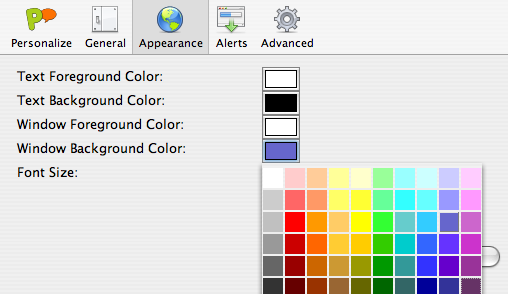
<p>Feel free to customize your chat window.  Click the "Options" in the toolbar, click on the "Appearance" tab, and pick the colors you prefer and see the result!</p>

<p><img src="http://peekko.com/chat/images/color-panel.png" alt="colorpicker"/></p>

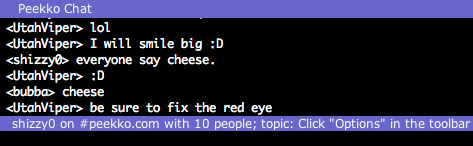
<p>Here's what I prefer:</p>

<p><img src="http://peekko.com/chat/images/other-colors.png" alt="colorpicker"/></p>

<div class="byline">
  Revised on February 14, 2006 14:01:39 
  by
  <a class="existingWikiWord" href="Shane.html">Shane</a>
</div>


</div> <!-- Content -->

</div> <!-- Container -->

</body>
</html>